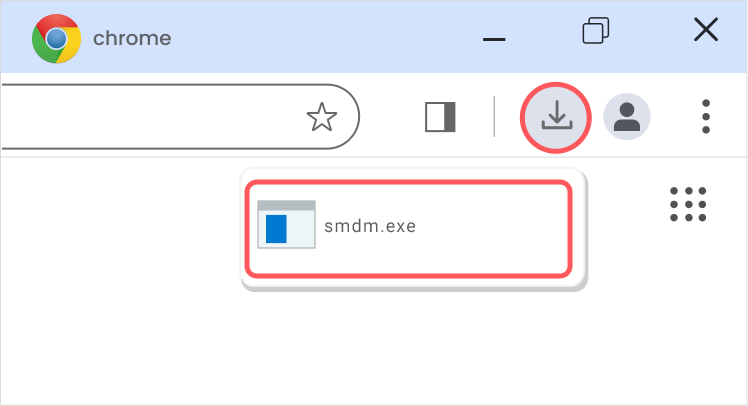
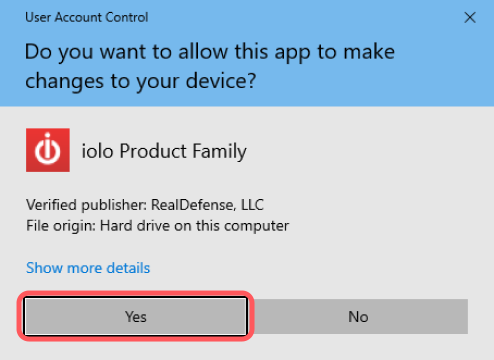
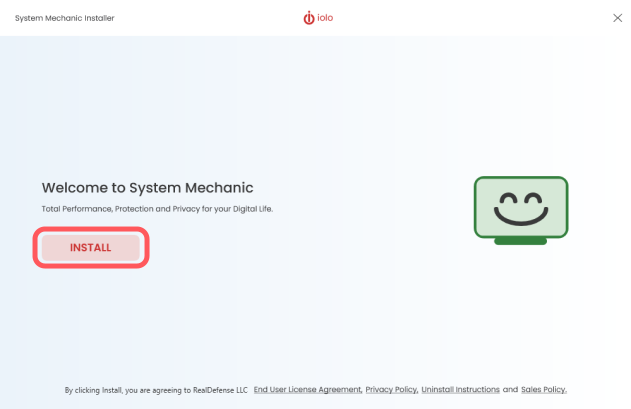
From the browser window on your PC, press Ctrl + J and look for the file named smdm.exe. Then click the file name to open the installer.
Still can’t find it?
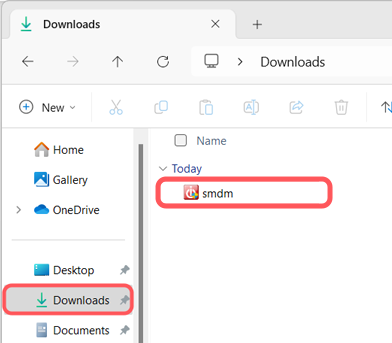
Open File Explorer on your PC and look in your Downloads folder for the smdm.exe file.
BONUS:
includes 15 tools and features
Performance
ActiveCare
Advanced cleaning and repair removes more unsafe clutter and fixes more problems than ever before, going to work whenever your PC is idle.
Internet Cleanup
Delete temporary internet files for better responsiveness
Windows Cleanup
Delete Windows junk files to unleash speed
Memory Mechanic
Free up memory for better performance
NetBooster
Optimize settings to speed up internet connections
Registry Cleanup
Find and repair registry files to improve performance
Security Optimizer
Detect and resolve Windows security issues
Program Accelerator
Detect and resolve Windows security issues
Toolbox
Startup Optimizer
Speed up Windows startup time
Network Scanner
View external devices and connections
File Incinerator
Remove and destroy deleted files
Advanced Uninstaller
Easily remove installed programs
Process Scanner
Find memory-intensive background tasks
Deceptive Programs
Find and remove harmful software
AppPrioritizer
Prioritize speed and efficiency for the apps you use most
What is iolo's Whole Home License?
The Whole Home License® is iolo’s licensing policy that allows you to install and keep your software running on all of your compatible devices within the same home. Previously, users were allowed to install and license their iolo software simultaneously on a maximum of three PCs. Under the Whole Home License, a single activation key allows you to use your iolo software on all of your PCs, other than any PCs you use for business purposes.What you need to know about Whole Home Licensing
You, your spouse, and your relatives living within the same household may use the same license on any number of PCs that you own which are not used for business.