注意:

PCのパフォーマンスを復元!

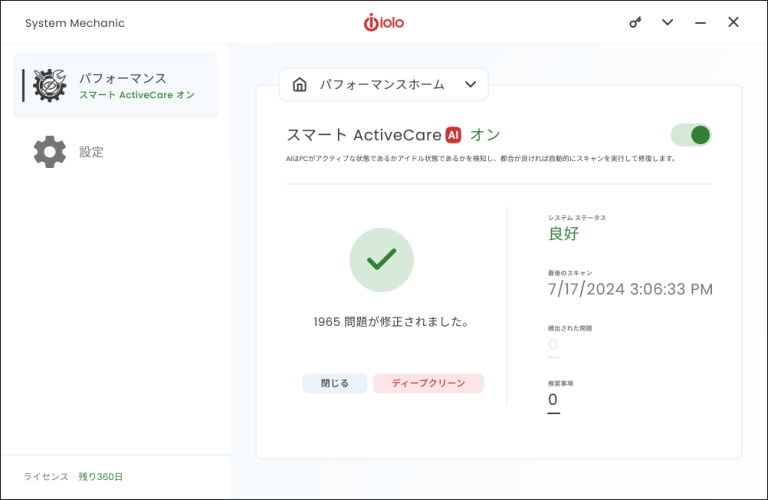
すべてのPCは、コンピューターの動作を静かに遅くするジャンクファイルやレジストリエラーを蓄積します。System Mechanicは、一般的な問題を修正して、新品同様に動作するようにします。

8回受賞

System Mechanicで問題を解決し、パフォーマンスを向上

よくある質問

Windows PCを使用するだけでも、不要なファイル、メモリの問題、エラーが発生する可能性があります。iolo System Mechanicソフトウェアは、PCの正常性を維持するのに役立ちます。アプリ、ドライバー、ゲーム、またはその他のファイルをダウンロードして使用するたびに、PCのシステムレジストリにデータを保存し、一時的なジャンクファイルを作成します。時間の経過とともに、このレジストリにエラーが発生し、これらのジャンクファイルがシステムメモリを圧迫する clutter を作成します。これが起こると、コンピューターの遅延、フリーズ、またはクラッシュが発生する可能性があります。Iolo System Mechanicは、これらの問題を特定して解決します。
これらの重要なシステムの問題を修復することは、PCを高速かつ応答性を維持するための鍵です。レジストリエラー、低メモリ、PCを clutter するジャンクファイルなどのシステムの問題を無視すると、エラー、ラグ、クラッシュ、または破損したファイルが発生するリスクがあります。システムの問題を修正および回避する最良の方法は、バックグラウンドでPCを自動的にスキャンし、問題が発生したときに特定し、迅速に修復および排除するユーティリティを使用することです。この種のユーティリティは、複数のアプリの実行、ゲーム、および重要なファイルの保存に十分なメモリを備え、PCを高速かつ応答性を維持するのに役立ちます。
System Mechanicソフトウェアは、システムの問題を自動的にスキャン、検出、修復、および排除します。System Mechanicは、不要なジャンクファイルを削除し、レジストリエラーを修正し、メモリを解放することにより、コンピューターの速度と効率を回復します。コンピューターがアイドル状態のときにハードドライブをスキャンし、見つかった問題を修復および排除します。20年以上にわたり、System Mechanicは、世界中の数千万人のユーザーに、受賞歴のあるPCパフォーマンス、プライバシー、および保護ソフトウェアを提供してきました。
HPユーザーは、System Mechanicを購入する際に、HP限定の割引を受けられます。System Mechanicの1つのサブスクリプションは最大10台のデバイスに適用されるため、自宅のすべてのコンピューターを保護できます。System MechanicはPCを自動的にスキャンして修復するため、システムの問題を自分で検出して修正しようとするストレスを軽減できます。このソフトウェアは、シンプルで合理化されたインターフェイスで使いやすいため、テクニカルサポートに電話して使用する時間を無駄にすることはありません。

未解決のPCの問題は、コンピューターの速度を低下させる可能性があります

レジストリエラー、低メモリ、不要な clutter などの一般的なシステムの問題は、コンピューターの遅延、フリーズ、またはクラッシュを引き起こす可能性があります。これらの問題を解決すると、PCの速度とパフォーマンスが向上するため、修正にかかる時間を短縮し、より多くの時間を使用できます。

PCのパフォーマンスを向上させる

速度を向上

ゲーム、編集、またはストリーミング中に、より高速でスムーズなパフォーマンスを実現するために、CPUとRAMを最適化します。

問題を修復

PCがアイドル状態のときに、バックグラウンドで30,000を超えるさまざまな問題を検索して修正し、安定して更新された状態に保ちます。

ブロートウェアを削除

知らないうちに実行され、速度を低下させている不要なスタートアッププログラムを検索して削除します。

プライバシーを保護

機密性の高い閲覧履歴を安全にワイプし、PCを脆弱にする可能性のあるWindowsセキュリティの問題を修正します。

インターネットを高速化

インターネット設定を最適化して、より高速なサーフィンとダウンロード、およびより安定した接続を実現します。

散らかり を排除

50種類以上の隠れたジャンクファイルを削除して、貴重なドキュメント、ビデオ、音楽、写真用のディスクスペースを解放します。

4.1
3013 reviews

あなたは良い手に委ねられています

世界中の何百万人もの人々が、すでにSystem MechanicをPCの問題を修正するためのツールにしています。
4.2
4.2/5
4.5
4.5/5
4.7
4.7/5

お待ちください
50%割引

今すぐ50%割引
いいえ、PCの高速化は不要です
期間限定オファー

System Mechanicのインストーラーファイルの検索方法

PCのブラウザウィンドウで、Ctrl + Jキーを押して、smdm.exeという名前のファイルを探します。次に、ファイル名をクリックしてインストーラーを開きます。

それでも見つからない場合

PCでファイルエクスプローラーを開き、ダウンロードフォルダーにあるsmdm.exeファイルを探します。

BONUS:

includes 15 tools and features

Performance

ActiveCare

Advanced cleaning and repair removes more unsafe
clutter and fixes more problems than ever before,
going to work whenever your PC is idle.

Internet Cleanup

Delete temporary internet files for better responsiveness

Windows Cleanup

Delete Windows junk files to unleash speed

Memory Mechanic

Free up memory for better performance

NetBooster

Optimize settings to speed up internet connections

Registry Cleanup

Find and repair registry files to improve performance

Security Optimizer

Detect and resolve Windows security issues

Program Accelerator

Detect and resolve Windows security issues

Toolbox

Startup Optimizer

Speed up Windows startup time

Network Scanner

View external devices and connections

File Incinerator

Remove and destroy deleted files

Advanced Uninstaller

Easily remove installed programs

Process Scanner

Find memory-intensive background tasks

Deceptive Programs

Find and remove harmful software

AppPrioritizer

Prioritize speed and efficiency for the apps you use most

What is iolo's Whole Home License?

The Whole Home License® is iolo’s licensing policy that allows you to install and keep your software running on all of your compatible devices within the same home. Previously, users were allowed to install and license their iolo software simultaneously on a maximum of three PCs. Under the Whole Home License, a single activation key allows you to use your iolo software on all of your PCs, other than any PCs you use for business purposes. What you need to know about Whole Home Licensing

  • You, your spouse, and your relatives living within the same household may use the same license on any number of PCs that you own which are not used for business.
  • For full legal terms and conditions, see https://www.iolo.com/company/legal/eula/

To install your iolo product on additional PCs:

  1. On the additional computer, download the latest version of your iolo product. Choose from the list of downloads offered here.
  2. Follow the steps in the installation wizard, and enter the same Activation Key that you used to install on your original computer.

You can view the Activation Key on the original computer from within System Mechanic > red menu bar > key icon > Activation Key.