

What’s New in System Mechanic® 21.5
June 2021
You have successfully installed the updated new version of System Mechanic ® 21.5
New version 21.5 offers more ways than ever to increase system speed, secure your home network, and protect your privacy.
New Advanced On-Demand Boost™ for a faster, more responsive PC
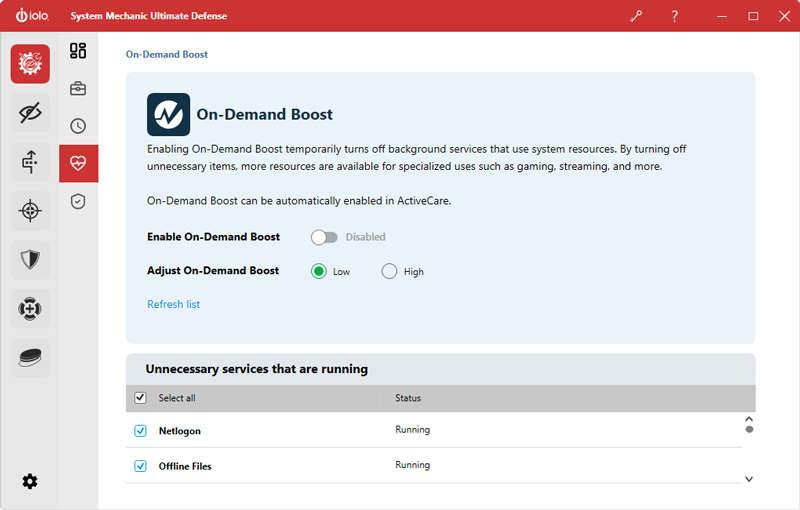
New and re-designed On-Demand Boost improves your PC’s responsiveness and performance whenever you choose. One click can now suspend system-taxing processes, in addition to running services.
- On-Demand Boost adds immense power to resource-intensive sessions such as gaming, rendering video, and other demanding tasks.
- Now On-Demand Boost offers you the ability to select specific processes that are draining computer resources and are unnecessary, allowing you to suspend them for a faster machine right when you need it most.
- Just choose from an automatically generated list of available processes you can pause to increase system speed even more.
Enhanced Network Scanner adds Bluetooth scanning
If you are experiencing significant slowdown, it may indicate that router ports are open and vulnerable to inviting spoofed DNS and other malicious queries.
- The System Mechanic Network Scanner lists both potentially vulnerable router ports and any associated service that might be malicious.
- Now the Network Scanner lists all the Bluetooth devices within your network that are broadcasting information.
- The Network Scanner now finds and lists more types of home connected devices, as well as open router ports on your Local Area Network. These can include security cameras, gaming consoles, smart TVs, phones, and many other connected devices.
- The new scanning ability includes both regular Bluetooth devices and devices that broadcast over BTLE protocol as well.
Enhanced Advanced Privacy Guardian™ data-mining protections
New features in Privacy Guardian can now prevent both the operating system and your installed apps from accessing and sharing a wide array of personal information. Available in System Mechanic® Ultimate Defense™ and System Mechanic as a trial.
Now you can easily disable Windows and third-party applications access to:
- Your Document libraries
- Your Video libraries
- Your Calendar
- Your Text and MMS messages
- Your Notifications
- Your Picture libraries
- Your Contacts
- Your Emails
- Your Call History
These locations may contain private images, information, or correspondence you don’t wish to share with the applications installed on your computer. Privacy Guardian makes turning them off simple.
Additional settings Privacy Guardian allows you to turn off to protect your data include:
- Phone calling
When phone calling is enabled by your operating system, you are allowing apps to make phone calls from your computer.
Because Windows uses your cellular service to make phone calls, you may be charged unexpected fees from your cellular service provider. - Device radio control
The wireless transmitters in your devices, such as WiFi and Bluetooth, are used by some applications to send and receive sensitive data.
Permitting applications the ability to turn WiFi and Bluetooth on or off relinquishes control over this type of data-sharing to the permitted applications. - Tasks list access
Enabling this setting allows your installed apps access tasks in Outlook or other task-tracking apps.
The tasks list is a detailed record of user tasks you may not want to share with third-party apps, in particular if you have created highly personalized tasks.
Enjoy these new enhancements and more in System Mechanic, System Mechanic Professional, and System Mechanic Ultimate Defense 21.5!
Choose the System Mechanic product that’s right for you:
Features
System Mechanic Ultimate Defense
System Mechanic Professional
System Mechanic

Optimize PC performance

Erase whole drives

Recover deleted files

Block malware

Remove malware

Securely manage passwords

Protect online privacy