AFK? PowerSense Helps Save Your Battery
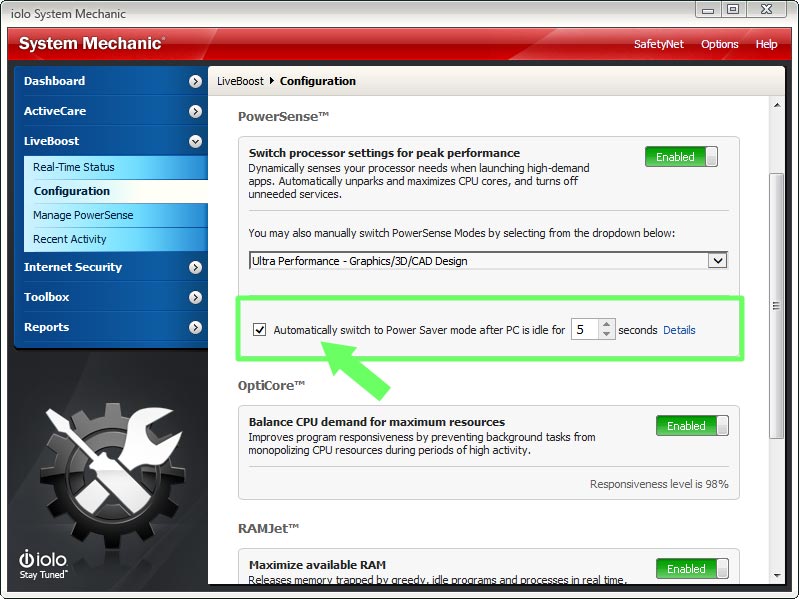
For times when your priority is a long-lasting laptop battery, PowerSense can trigger Windows Power saver automatically after your PC is idle for an interval of time that you specify. To enable this function:
- Within System Mechanic, click LiveBoost >> Configuration.
- Check the box next to Automatically switch to Power Saver mode after PC is idle for 5 seconds.
- Use the arrows to choose an interval of time other than 5 seconds, if desired.
- The Power saver plan will engage at the desired time, dimming your monitor and scaling back processor cores to prolong battery life.
Smart recommendations deliver personalized tips to keep your PC optimized and protected.
Speed up, secure, and simplify your digital life with System Mechanic©.
System Mechanic Special Offer
 Faster processor & internet speed8x PC Mag winner

position: fixed;
left: 50%;
margin-left: -385px;
top: 50%;
margin-top: -307px;
z-index: 10001;
display: none;
zoom: 1;
/*Box shadow*/
-webkit-box-shadow: 0px 3px 5px 0px rgba(50, 50, 50, 0.75);
-moz-box-shadow: 0px 3px 5px 0px rgba(50, 50, 50, 0.75);
box-shadow: 0px 3px 5px 0px rgba(50, 50, 50, 0.75);
}
.lightBox-content img {max-width: 100%;}